Skip to content
SOURCED IN JAPAN. SUPPORTED IN CYPRUS.Japan time 20:05:56 JST+357 95 950909
Customer login
Menu

YOUR FIRST AUCTION, MADE SIMPLE

How to bid at Japanese car auctions from Cyprus

Sign in to compare auction lots and recent sale prices. Before you bid, check what your maximum in Japan would cost once the car is registered in Cyprus.

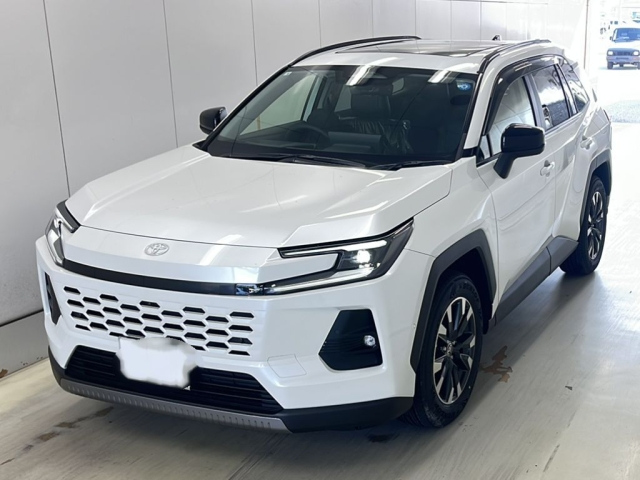
We’ll walk through a real 2026 Toyota RAV4 Hybrid Z listing. The numbered arrows show you exactly where to look.

€1,000 confirmed deposit to unlockEUR bid + Cyprus estimateYour account request, result & car journey
The real white 2026 Toyota RAV4 Hybrid Z used in this guide
OUR EXAMPLE CARToyota RAV4 · 2026

Hybrid Z · Grade S · Lot 45

Real auction listing captured 12 November 2026. Availability and prices change.

Tap any screenshot to enlarge it. Account screens use example data; bank details and auction results shown here are for explanation only.

01 UNLOCK BIDDING

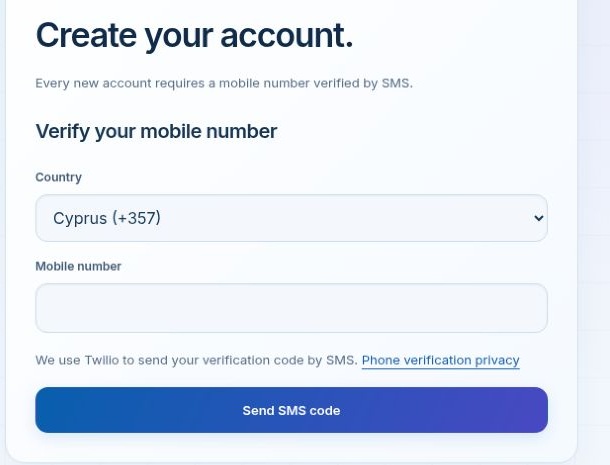
Create your account & verify your phone

Open My account → Create account. Already registered? Sign in and go to step 2.

  1. Choose your country and enter your mobile number.
  2. Select Send SMS code, then enter the six-digit code you receive.
  3. Complete your account details. Phone verification is required for every new account, including Google sign-up.
Create your account ↗
Mobile verification in the account creation screen
Customer sign-up screen · example view

02 DEPOSIT

Make your transfer, then report it

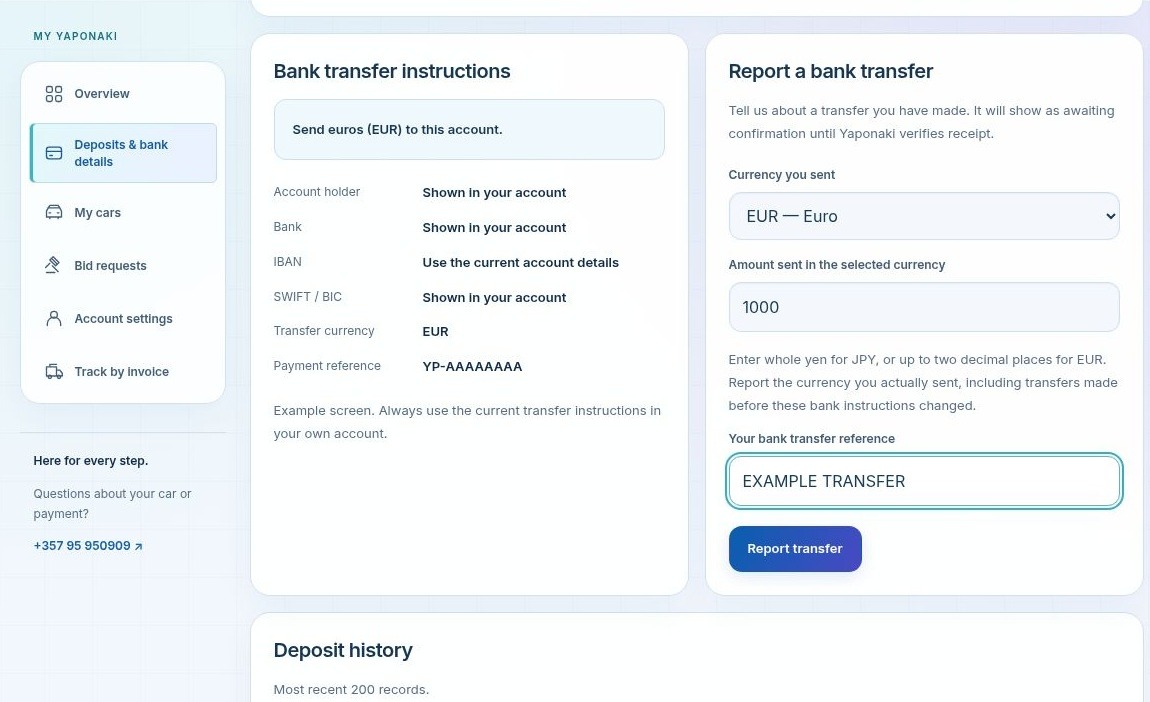
  1. In My account, open Deposits & bank details.
  2. Use the current bank instructions and payment reference in your own account to make the transfer through your bank.
  3. Under Report a bank transfer, enter the currency you actually sent, the amount and your bank’s transfer reference. Select Report transfer.

The bank details in this screenshot are placeholders. Reporting a transfer tells us to check it; it does not send money.

Open deposits & bank details ↗
Deposits navigation, bank instructions and transfer reporting form
Customer account · example transfer, bank details concealed

03 CONFIRMATION

Wait for “Bidding unlocked”

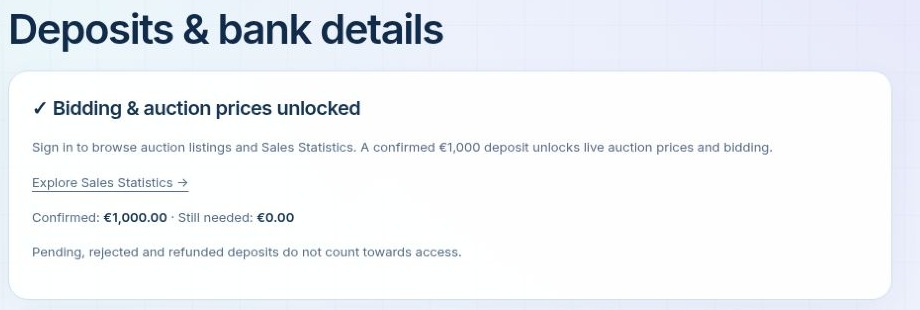
Yaponaki checks that the transfer has arrived. Once at least €1,000 is recorded as confirmed, your account shows Bidding unlocked.

A reported or pending transfer does not unlock bidding. Check your deposit history for the confirmation.

Confirmed deposit with bidding unlocked
Customer account · example confirmed deposit

04 FIND YOUR CAR

Search the auction listings

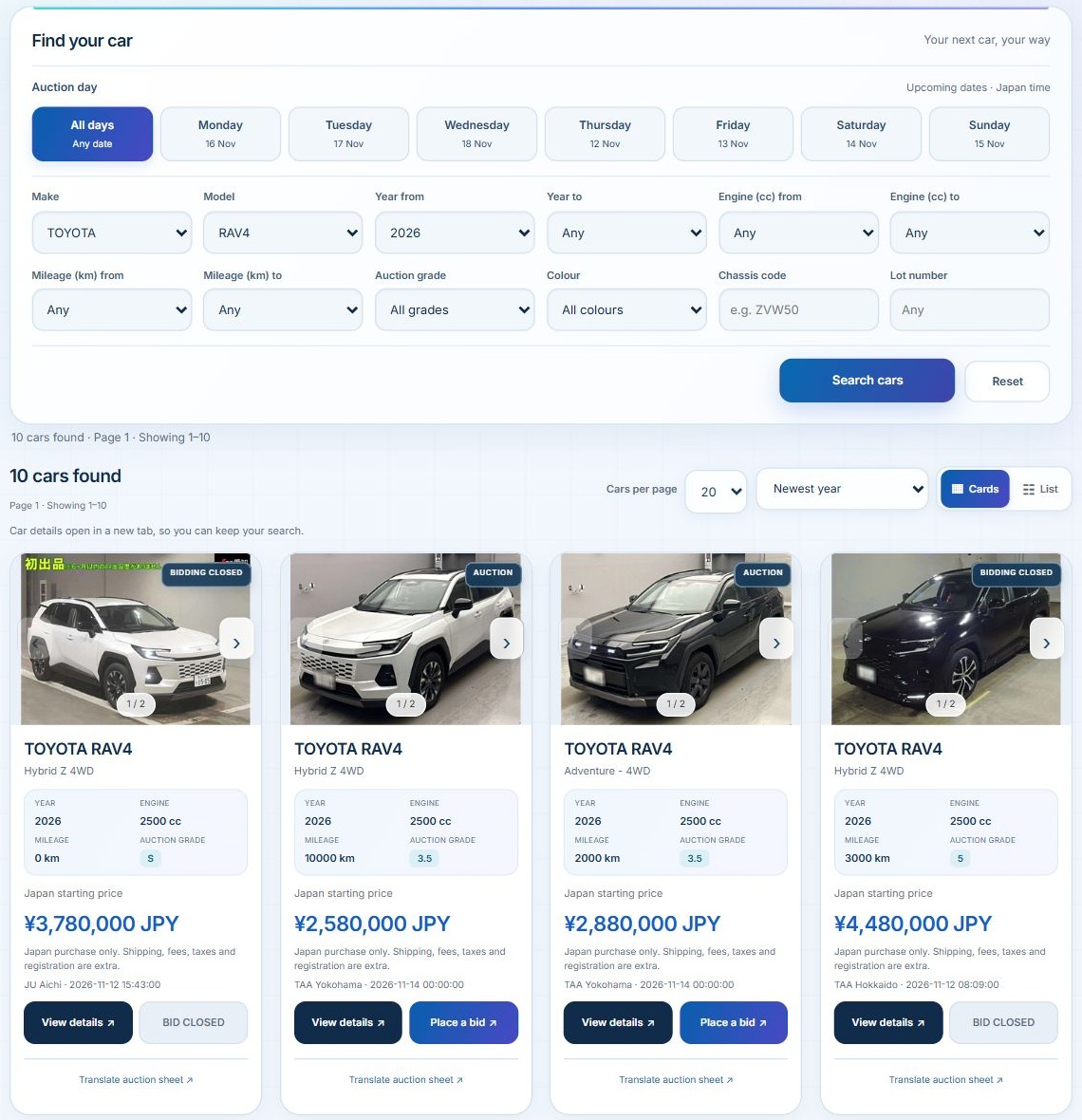
  1. Open Auctions. Choose your make, model, year and any other preferences, then select Search cars. Here we chose Toyota, RAV4 and 2026.
  2. Check the auction day, mileage and grade. Select View details or Place a bid to open the car in a new tab.

Use Sales Statistics to compare similar cars before choosing a budget. A starting price is not a final sale price.

Browse 2026 RAV4 auctions ↗
Toyota RAV4 2026 filters and auction results with open and closed bid buttons
Real auction search · captured 12 November 2026

05 CHECK THE CAR

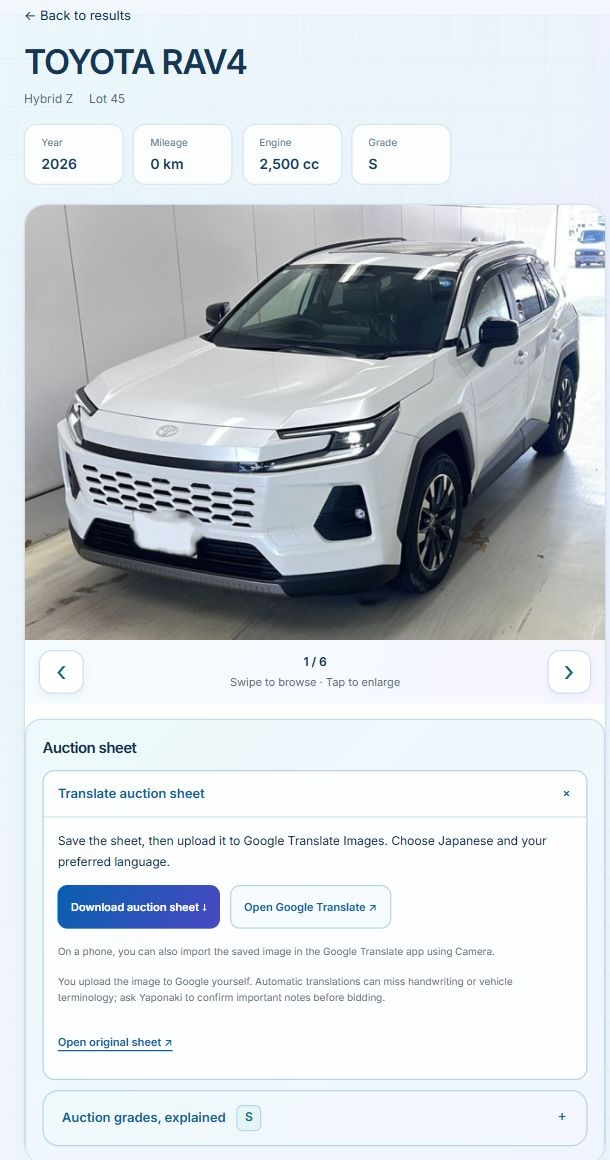
Review the photos & auction sheet

  1. Check the year, mileage and grade. Use the photo arrows to see the car and its auction sheet; tap a photo to enlarge it.
  2. Open Translate auction sheet to download the sheet and use Google Translate Images. Open Auction grades, explained for help with condition grades.
Understand auction sheets & grades ↗
Real RAV4 photos and expanded auction-sheet translation controls
Real 2026 RAV4 listing · lot 45

06 YOUR BUDGET

Enter your maximum bid & check the Cyprus estimate

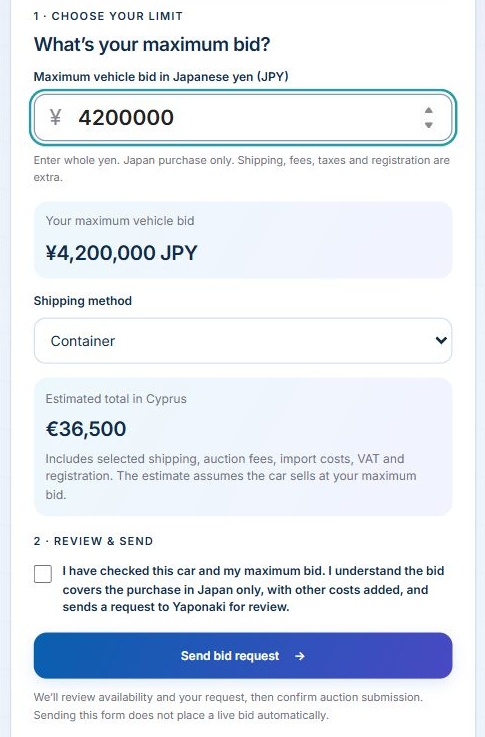
  1. Enter your maximum car-purchase bid in euros, using whole numbers. Our example is 23520.
  2. Choose Container or RoRo. The euro estimate updates for your bid and shipping choice.
  3. Check Estimated total in Cyprus before you send anything.
EXAMPLE AT THE TIME OF CAPTURE€23,520 €36,500

Maximum vehicle bid → estimated Cyprus total
Container shipping selected

Your euro bid covers the purchase in Japan. The separate Cyprus estimate includes selected shipping, auction fees, import costs, VAT and registration, assuming the car sells at your maximum bid. Use the current estimate on your listing.

Historical yen bid, shipping selection and calculated Cyprus estimate
Earlier bid form in yen · enter euros on the current form

07 REVIEW & SEND

Send your bid request

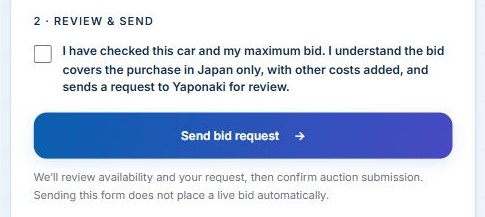
  1. Read the confirmation and tick the checkbox after checking the car, your maximum bid and the price explanation.
  2. Select Send bid request.
Confirmation checkbox and Send bid request button
Real bid form · screenshot taken before submission

08 FOLLOW YOUR REQUEST

Open “Bid requests” in your account

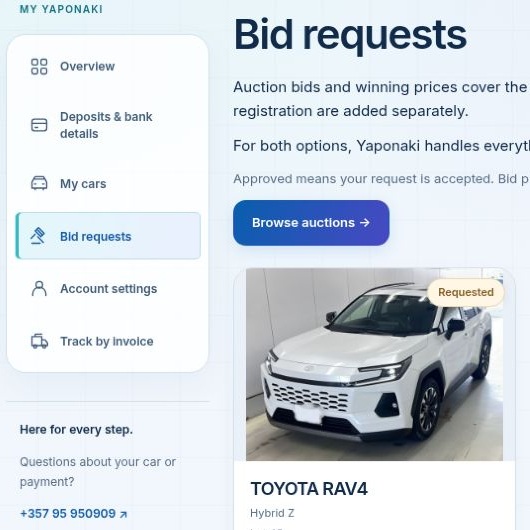
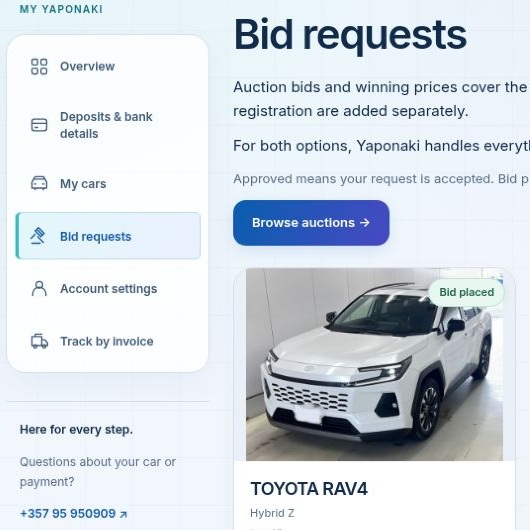
  1. Go to My account → Bid requests. Your car appears with its request status.
  2. Look at the badge on the car photo. Requested means received; Approved means the request is accepted; Bid placed means Yaponaki has confirmed auction submission.

If you see Reviewing, the team is checking your request. Rejected and Cancelled are request statuses, not a lost auction result.

Open your bid requests ↗
Bid requests menu and Requested badge on the RAV4
Example · request received
The same RAV4 with the Bid placed badge
Example · auction submission confirmed

09 YOUR AUCTION RESULT

Did you win the car?

Return to My account → Bid requests after the auction. Results and final sale prices appear when Yaponaki records them. A closed auction alone is not a confirmed result.

These are two illustrative outcomes for the same RAV4, using a €23,520 maximum bid. They are not the actual result of this listing.

IF YOU WIN

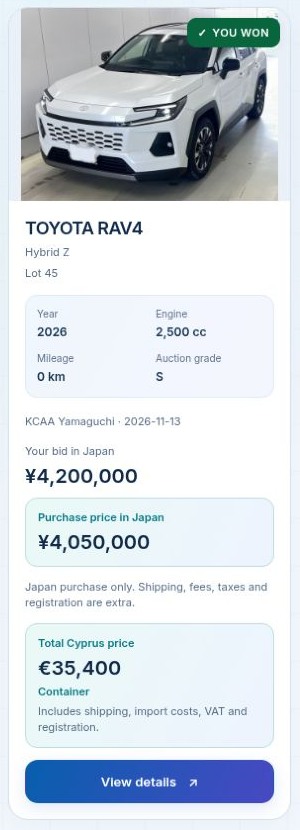
Look for “YOU WON”

  1. The green YOU WON badge identifies the winning car.
  2. Check Purchase price in Japan and Total Cyprus price. The Cyprus total uses the recorded purchase price and your selected shipping method.

In this example, the car was won for €22,680, below the €23,520 maximum. Its Container total becomes €35,400.

Winning RAV4 with its purchase price and recalculated total Cyprus price
Illustrative win · example prices
IF YOU LOSE

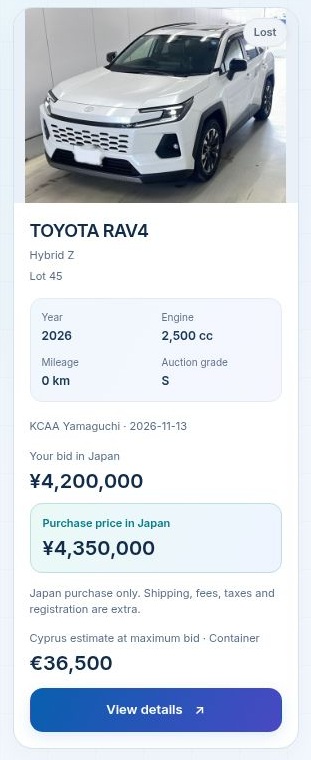
Look for “Lost”

  1. The car’s badge shows Lost when the result is recorded.
  2. The final Japan sale amount appears when added by Yaponaki. Your original maximum bid remains visible for comparison.

In this example, the car sold for €24,360, above the €23,520 maximum. The old Cyprus estimate is still an estimate for your bid; it is not a purchase invoice.

Lost RAV4 with the final sale amount above the maximum bid
Illustrative loss · example prices

10 AFTER A WIN

Your car’s journey continues in “My cars”

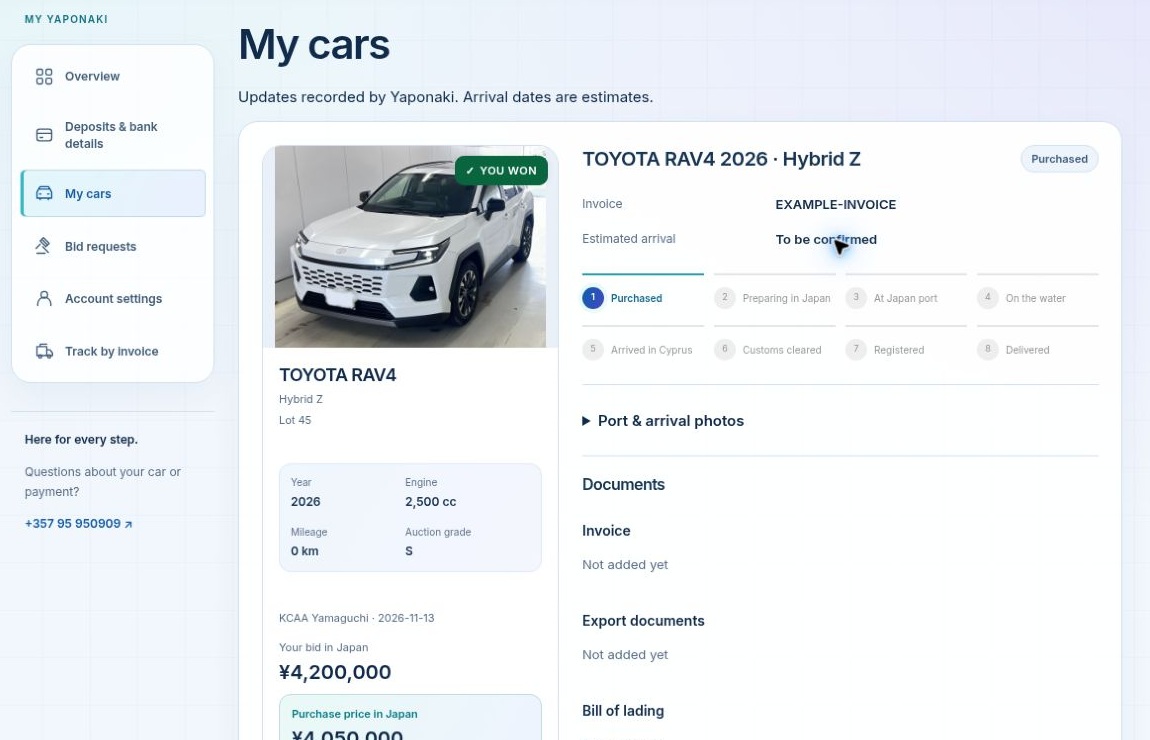
  1. Once Yaponaki adds your purchased car, open My account → My cars.
  2. Follow the progress from purchase and preparation in Japan through shipping, Cyprus registration and delivery.
  3. Check this page for port photos, your invoice, export documents and bill of lading as the team adds them.
Open My cars ↗

Shipping from Japan and registration in Cyprus

If you have a confirmed win but the car has not appeared yet, contact Yaponaki with the lot number.

My cars dashboard showing the purchased RAV4, delivery stages and document sections
Customer dashboard · example purchased car

READY WHEN YOU ARE

Your next car starts with a clear budget.

Choose an open auction, check the car and your Cyprus estimate, then send your request.